SaaS companies invest significant resources in building new features, improving workflows, and expanding product capabilities. Yet many of those investments fail to deliver their full value because users never discover, understand, or adopt the features that were built for them.
At the same time, support teams continue answering repetitive questions that could have been prevented with better product guidance.
This creates a common SaaS challenge: low feature adoption combined with growing support costs.
The solution is not more documentation, longer onboarding sessions, or additional training materials.
The solution is implementing In-App Contextual Help that delivers the right guidance to the right user at the exact moment they need it.
When implemented strategically, contextual guidance helps users discover valuable features, complete workflows successfully, and solve problems independently. The result is higher adoption, faster time-to-value, improved user satisfaction, and fewer support tickets.
This guide explains how SaaS teams can implement contextual help effectively to drive measurable adoption outcomes while reducing support dependency.
Why Most SaaS Features Struggle to Gain Adoption
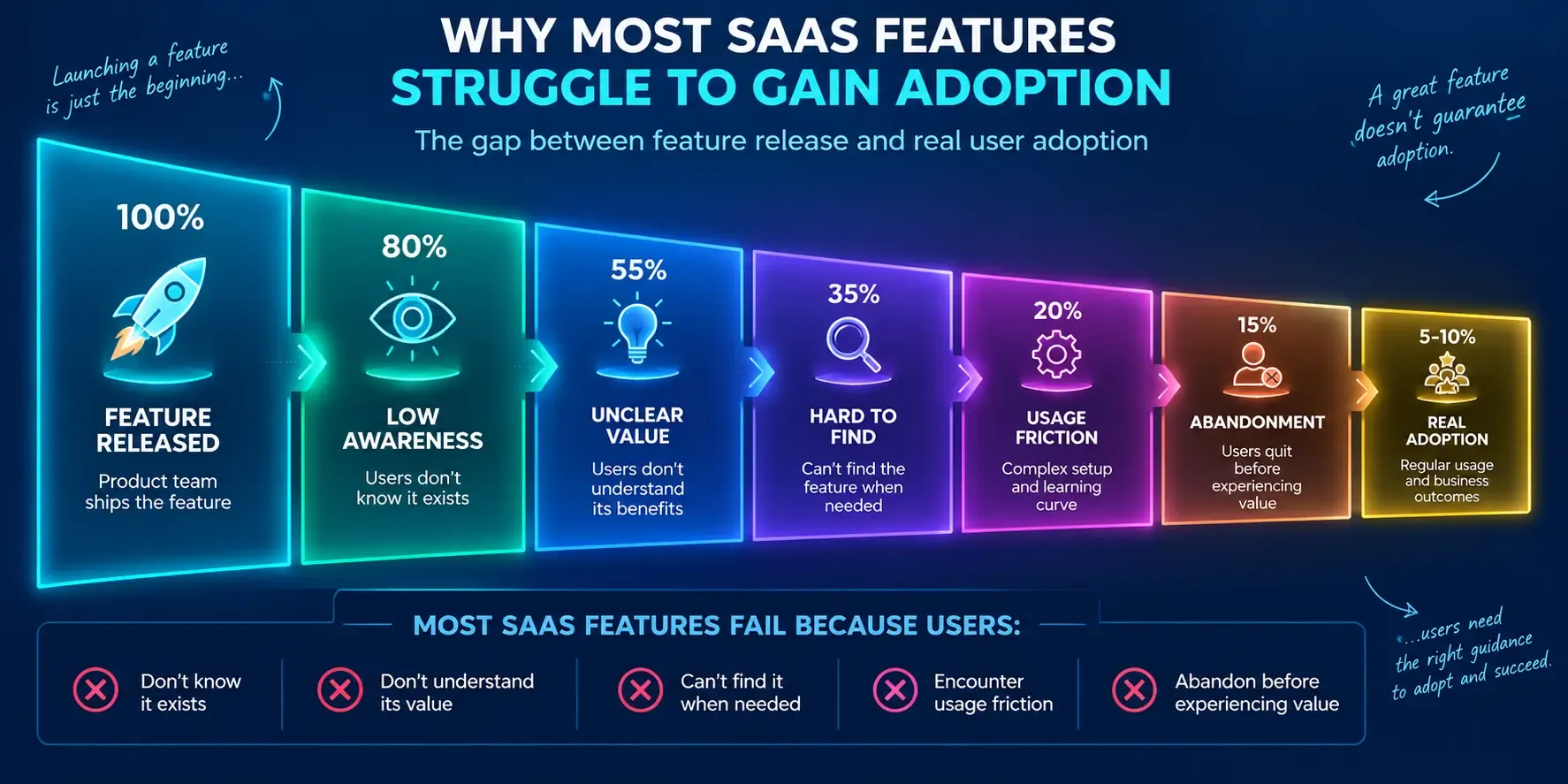
Many product teams assume that releasing a feature automatically leads to adoption.
In reality, feature releases and feature adoption are entirely different outcomes. This gap often reflects the technology adoption curve, where different groups of users adopt new features at varying speeds based on their readiness, experience, and willingness to embrace change.
A feature can be technically excellent and still fail if users:
- Don't know it exists
- Don't understand its value
- Cannot find it when needed
- Encounter friction during usage
- Abandon workflows before completion
Research consistently shows that software adoption remains one of the biggest barriers to realizing technology ROI. Organizations frequently invest in capabilities that remain underutilized because users never fully incorporate them into their daily workflows. Many organizations address this challenge by implementing a Digital Adoption Platform (DAP) that provides contextual guidance, onboarding experiences, and real-time support directly within applications.
The issue is rarely product quality.
More often, users simply need guidance at the moment they are trying to accomplish a task.
This is where contextual assistance becomes critical.
The Link Between Contextual Help, Feature Adoption, and Support Ticket Reduction
Before implementing a strategy, it is important to understand why contextual guidance works.
Traditional support models rely on users identifying a problem and then searching for help.
That process usually looks like this:
- User encounters confusion.
- User leaves the workflow.
- User searches documentation.
- User contacts support if answers aren't found.
Every additional step increases friction.
By contrast, contextual guidance delivers assistance directly within the workflow.
Instead of forcing users to search for answers, guidance appears when confusion is most likely to occur.
This approach helps improve:
- Feature Adoption
- Workflow completion rates
- Time-to-value
- Product proficiency
- Customer satisfaction
At the same time, it reduces repetitive support requests by helping users solve common problems independently.
Step 1: Identify Features With High Business Value but Low Adoption
The first step is determining where contextual help can create the greatest impact.
Not every feature requires guidance.
Focus on features that meet three criteria:
| Evaluation Criteria | Why It Matters |
| High business value | Influences retention, expansion, or product value |
| Low usage rates | Indicates adoption challenges |
| Frequent support inquiries | Signals user friction |
Examples often include:
- Advanced reporting
- Workflow automation
- Integrations
- Collaboration tools
- Configuration settings
- Enterprise features
These areas typically provide the highest return from contextual guidance because improving adoption directly influences customer outcomes.
Instead of creating help content for everything, prioritize the features that matter most. This is especially important for organizations using employee productivity software, where underutilized features can reduce efficiency and limit the return on technology investments.
Step 2: Analyze User Friction Using Product and Support Data
The best contextual help strategies begin with evidence rather than assumptions.
To understand where users struggle, analyze:
- Product analytics
- Session recordings
- User interviews
- Support tickets
- Customer feedback
- Success team insights
Look for patterns such as:
- Workflow abandonment
- Repeated user errors
- Incomplete setup processes
- Frequently searched topics
- Common support requests
For example, if users consistently abandon integration setup at a specific step, that workflow becomes a candidate for contextual intervention.
This process helps connect adoption challenges to real user behavior rather than relying on guesswork. Many enterprises are also incorporating AI change management strategies to identify adoption bottlenecks, predict user resistance, and deliver more personalized guidance experiences.
Step 3: Map Contextual Help to Specific User Actions
One of the most common mistakes companies make is showing guidance based on page views alone.
Effective contextual help is triggered by actions, not locations.
Instead of asking:
"What page is the user viewing?"
Ask:
"What is the user trying to accomplish?"
For example:
| User Action | Contextual Guidance Opportunity |
| Creating first workflow | Setup assistance |
| Configuring integrations | Step-by-step guidance |
| Viewing reports repeatedly | Advanced reporting suggestions |
| Inviting team members | Collaboration feature recommendations |
| Exporting data manually | Automation recommendations |
This action-based approach creates more relevant experiences because guidance aligns with user intent.
It also improves User Engagement because users receive assistance that helps them complete meaningful tasks.
Step 4: Deliver Guidance at the Exact Moment Users Need It
Timing is often more important than content.
Even valuable information becomes ineffective when delivered too early or too late.
Successful contextual help appears when users are most likely to need assistance.
Examples include:
- Explaining a complex setting before configuration
- Offering recommendations during workflow creation
- Providing instructions before a common error occurs
- Highlighting advanced options when users demonstrate readiness
This form of In-App Guidance allows users to learn naturally while working.
Instead of interrupting workflows, guidance becomes part of the workflow itself.
Organizations increasingly recognize that users learn software more effectively when support appears in context rather than requiring separate learning experiences.
Step 5: Use Contextual Help to Drive Feature Discovery
Many organizations focus exclusively on onboarding and overlook feature discovery.
However, some of the most valuable adoption opportunities occur long after onboarding ends.
Users cannot adopt features they never discover.
This makes feature discovery one of the most important applications of contextual guidance.
Effective examples include:
- Recommending automation after repetitive actions
- Introducing collaboration tools as teams grow
- Highlighting advanced filters when reporting usage increases
- Suggesting integrations when manual work becomes excessive
These recommendations help users uncover additional value precisely when that value becomes relevant.
This strategy is particularly effective for improving Product Adoption because it aligns education with real-world usage patterns.
Step 6: Build Self-Service Support Into Critical Workflows
One of the fastest ways to reduce support volume is to prevent confusion before it generates a ticket.
Most support requests are predictable.
Examples include:
- Where can I find a setting?
- How do I complete this task?
- Why isn't this workflow working?
- How do I configure this feature?
Instead of requiring users to leave the application and search external resources, organizations increasingly embed support directly into workflows.
This can include:
- Contextual recommendations
- Embedded documentation
- Guided assistance
- Workflow support prompts
By combining Self-Service Support and In-App Support, users can resolve common issues independently.
The result is a stronger Customer Self-Service experience and lower support costs.
Step 7: Measure Adoption and Support Outcomes
Implementation should never end at deployment.
The most effective contextual help programs continuously measure performance and optimize experiences.
Track metrics such as:
Feature Adoption Rate
Measures how many users actively use targeted features.
User Activation Rate
Measures how quickly users reach meaningful milestones.
Workflow Completion Rate
Measures task success.
Support Deflection Rate
Measures how many issues are resolved without support intervention.
Time-to-Value
Measures how quickly users achieve desired outcomes.
Retention Impact
Measures whether adoption improvements influence customer success over time.
These metrics connect contextual guidance directly to business performance
Which Contextual Help Formats Drive the Highest Adoption?
Different guidance formats serve different purposes.
The best implementations use multiple approaches depending on the workflow.
| Guidance Format | Best Use Case | Adoption Impact |
| Tooltips | UI clarification | Moderate |
| Checklists | New-user setup | High |
| Interactive Walkthroughs | Complex workflows | Very High |
| Product Tours | Initial orientation | Moderate |
| Contextual recommendations | Feature discovery | High |
| Embedded support widgets | Self-service assistance | High |
| Guided workflows | Multi-step tasks | Very High |
The most successful organizations select formats based on user intent rather than applying the same guidance everywhere.
Why SaaS Companies Are Investing in Contextual Guidance
Software adoption remains a top priority for SaaS organizations because underutilized software directly impacts business outcomes.
According to Gartner, organizations frequently fail to realize the full value of software investments due to adoption challenges. Gartner also highlights growing interest in digital adoption technologies that help users learn software within the flow of work. In many cases, digital transformation failure occurs when organizations focus heavily on software implementation but invest too little in user onboarding, training, and ongoing adoption support.
McKinsey research similarly emphasizes that user adoption plays a critical role in determining whether technology initiatives generate meaningful business value.
The takeaway is clear:
Building features is no longer enough.
Organizations must also help users adopt those features effectively
Common Mistakes That Prevent Contextual Help From Improving Adoption
Even well-intentioned guidance programs can fail when implementation is poor.
Common mistakes include:
Showing Guidance Too Early
Users cannot absorb information that lacks immediate relevance.
Delivering Generic Experiences
Different users require different levels of assistance.
Overwhelming Users With Too Much Information
More guidance does not always produce better outcomes.
Focusing Only on Onboarding
Adoption continues long after onboarding ends.
Measuring Engagement Instead of Outcomes
Guide views are less important than adoption, activation, and retention metrics.
Avoiding these mistakes significantly improves the effectiveness of contextual guidance initiatives.
How Leading SaaS Teams Scale Contextual Help Across the Product Lifecycle
The most successful organizations do not treat contextual guidance as an onboarding project.
They treat it as an ongoing adoption system.
This means supporting users throughout:
User Onboarding
- Workflow execution
- Feature discovery
- Expansion opportunities
- Long-term engagement
As products evolve, guidance evolves alongside them.
Many organizations use platforms such as GuideNow and other adoption solutions to manage guidance experiences across multiple workflows while maintaining consistency and scalability.
The goal is not simply to help users learn software.
The goal is to help users continuously unlock more value from the software over time.
Conclusion
Implementing In-App Contextual Help is one of the most effective ways to increase feature adoption while reducing support tickets.
Rather than relying on documentation, training sessions, or reactive support models, contextual guidance helps users succeed directly within the workflow.
The most effective implementations follow a structured process:
- Identify high-value features with low adoption.
- Analyze friction using user and support data.
- Map guidance to specific actions.
- Deliver assistance at the moment of need.
- Drive feature discovery through contextual recommendations.
- Build self-service support into workflows.
- Measure outcomes and optimize continuously.
When these elements work together, users discover more value, adopt more features, complete more workflows successfully, and require less support.
Ultimately, contextual help is not just a support tool.
It is an adoption strategy that helps SaaS companies maximize product value while creating a better experience for every user.
Frequently Asked Questions
1. What is the difference between contextual help and a knowledge base?
A Knowledge Base Software solution requires users to search for information manually, while contextual help proactively delivers guidance within the application based on user actions and workflows.
2. How does contextual help improve feature adoption?
It introduces relevant features at the moment users are most likely to benefit from them, making discovery, understanding, and adoption significantly easier.
3. Which features should receive contextual guidance first?
Prioritize features that have high business value, low adoption rates, and generate frequent support inquiries.
4. How can companies measure the success of contextual help?
Track feature adoption rates, activation metrics, workflow completion rates, support deflection, retention impact, and time-to-value.
5. Can contextual help completely replace customer support?
No. Contextual guidance should resolve routine questions and workflow issues, allowing support teams to focus on complex customer challenges and strategic assistance.