Modern software products are becoming increasingly powerful—but also increasingly complex. Whether it's a SaaS platform, CRM, ERP, HRMS, or enterprise application, new users often face a steep learning curve before they can confidently complete everyday tasks. This is where product tour software has become an essential component of modern user experiences.
Instead of relying solely on documentation, lengthy onboarding sessions, or support tickets, organizations now use interactive product tour experiences to guide users through key workflows directly within the application. These guided experiences help users understand features as they work, reducing friction and accelerating confidence from the very first interaction.
Today's enterprises also recognize that successful software adoption depends on more than simply deploying new technology. Employees and customers need contextual guidance that helps them learn while performing real tasks. As a result, user onboarding software, product walkthrough software, and digital adoption software have become strategic investments for organizations looking to maximize technology ROI.
This guide explores what a product tour is, how product tour software works, why it improves software adoption, and the best practices organizations should follow when designing effective onboarding experiences.
What Is a Product Tour?
A product tour is an interactive, in-app experience that introduces users to a software product by guiding them through important features, workflows, or tasks in a logical sequence.
Unlike static documentation or video tutorials, product tours are embedded directly within the application. Users learn by completing real actions instead of simply reading instructions or watching demonstrations.
A typical product tour may include:
- Welcome screens
- Interactive walkthroughs
- Tooltips
- Hotspots
- Checklists
- Contextual prompts
- Progress indicators
These elements work together to reduce confusion while helping users quickly understand how the software delivers value.
Rather than overwhelming users with every available feature, an effective product tour focuses on the actions users need to complete to achieve their first meaningful outcome.
For example:
- A CRM platform may guide sales representatives through creating their first lead.
- An HR platform may walk managers through approving employee leave requests.
- A project management application may help new users create and assign their first task.
The objective is not simply to introduce the interface—it is to help users successfully accomplish important tasks with minimal friction.
How Product Tour Software Works
Product tour software enables organizations to build interactive guidance that appears inside applications without requiring users to leave their workflow.
Instead of asking users to search through documentation or contact support, the software delivers relevant guidance at the exact moment users need assistance.
A modern product tour typically includes several components:
Component | Purpose |
| Welcome Screen | Introduces users to the onboarding experience |
| Interactive Walkthrough | Guides users step by step through key workflows |
| Tooltips | Explain interface elements without interrupting work |
| Hotspots | Draw attention to newly introduced features |
| Checklists | Encourage users to complete onboarding milestones |
| Contextual Prompts | Deliver assistance based on user behavior |
| Progress Tracking | Measures onboarding completion and engagement |
These experiences adapt to user actions, making onboarding more personalized than traditional training methods.
Product Tour vs Traditional Software Tutorials
Many organizations still rely on PDF manuals, knowledge bases, webinars, or lengthy onboarding videos. While these resources remain useful for reference, they often fail to support users during real work.
The key difference lies in when and where learning happens.
Traditional Tutorials | Product Tours |
| Passive learning | Interactive learning |
| Separate from application | Embedded inside the application |
| Requires users to remember information | Contextual guidance based on workflow |
| Often skipped | Higher engagement through interaction |
| Generic content for everyone | Contextual guidance based on workflow |
| Delayed application | Immediate hands-on experience |
By delivering learning within the application, product tours reduce cognitive overload and improve long-term knowledge retention.
Why Product Tours Have Become Essential for Modern Software
Today's enterprise applications contain hundreds—or even thousands—of features.
Without structured guidance, users often:
- Feel overwhelmed by unfamiliar interfaces
- Ignore advanced capabilities
- Depend heavily on support teams
- Develop inefficient workarounds
- Abandon software before experiencing its full value
This challenge affects both employee-facing and customer-facing software.
Whether organizations are implementing Employee software onboarding, launching new SaaS products, or improving crm onboarding, users expect intuitive guidance that helps them become productive quickly.
Modern workplaces also experience continuous change:
- New software releases
- AI-powered features
- Updated workflows
- Process improvements
- Compliance requirements
- Cross-functional collaboration
Because these changes happen frequently, users need continuous guidance—not just one-time training.
Product tours help organizations deliver that guidance directly within daily workflows.
The Role of Product Tours in Software Adoption
Implementing new software is only the first step. Real business value comes when users consistently adopt the technology and use it correctly.
This is where product onboarding becomes critical.
A well-designed product tour helps users reach important milestones faster, such as:
- Creating their first project
- Completing an approval workflow
- Importing customer data
- Submitting reports
- Configuring dashboards
- Inviting teammates
- Exploring advanced capabilities
Each successful interaction increases confidence while reducing resistance to change.
Instead of viewing onboarding as a one-time event, organizations increasingly see it as an ongoing adoption journey supported by contextual guidance.
This approach aligns closely with broader enterprise software adoption initiatives, where the objective extends beyond training completion to measurable business outcomes such as higher productivity, improved user engagement, and reduced support dependency.
Product Tours Throughout the User Journey
An effective product tour is not limited to first-time onboarding. Different types of guidance support users at various stages of their journey.
User Stage | Product Tour Goal |
| First Login | Welcome users and explain core navigation |
| Initial Setup | Help users configure essential settings |
| First Task | Guide users toward their first success |
| Feature Discovery | Introduce advanced capabilities gradually |
| Product Updates | Highlight newly released functionality |
| Ongoing Adoption | Reinforce best practices through contextual guidance |
This progressive approach prevents information overload while continuously improving feature adoption across the user lifecycle.
Why Enterprises Are Moving Beyond Traditional Onboarding
Organizations investing in digital adoption platforms increasingly recognize that onboarding should be continuous rather than event-based.
Traditional onboarding assumes users can remember everything from a single training session. In reality, people learn best when information is delivered at the moment they need it.
As a result, many enterprises now combine website walkthrough software, contextual learning, and behavioral analytics to create adaptive onboarding experiences that evolve with users over time.
This shift also aligns with the broader technology adoption lifecycle, where successful adoption depends not only on deploying new technology but on helping users integrate it into their everyday work.
How Product Tour Software Drives Software Adoption
Many organizations invest heavily in new software but struggle to achieve widespread adoption. Employees may continue using legacy processes, customers may abandon products after sign-up, and advanced features often remain underutilized.
This is because successful software adoption depends not only on introducing technology but also on helping users understand how to use it effectively.
A well-designed product tour software solution bridges this gap by delivering contextual guidance throughout the user journey.
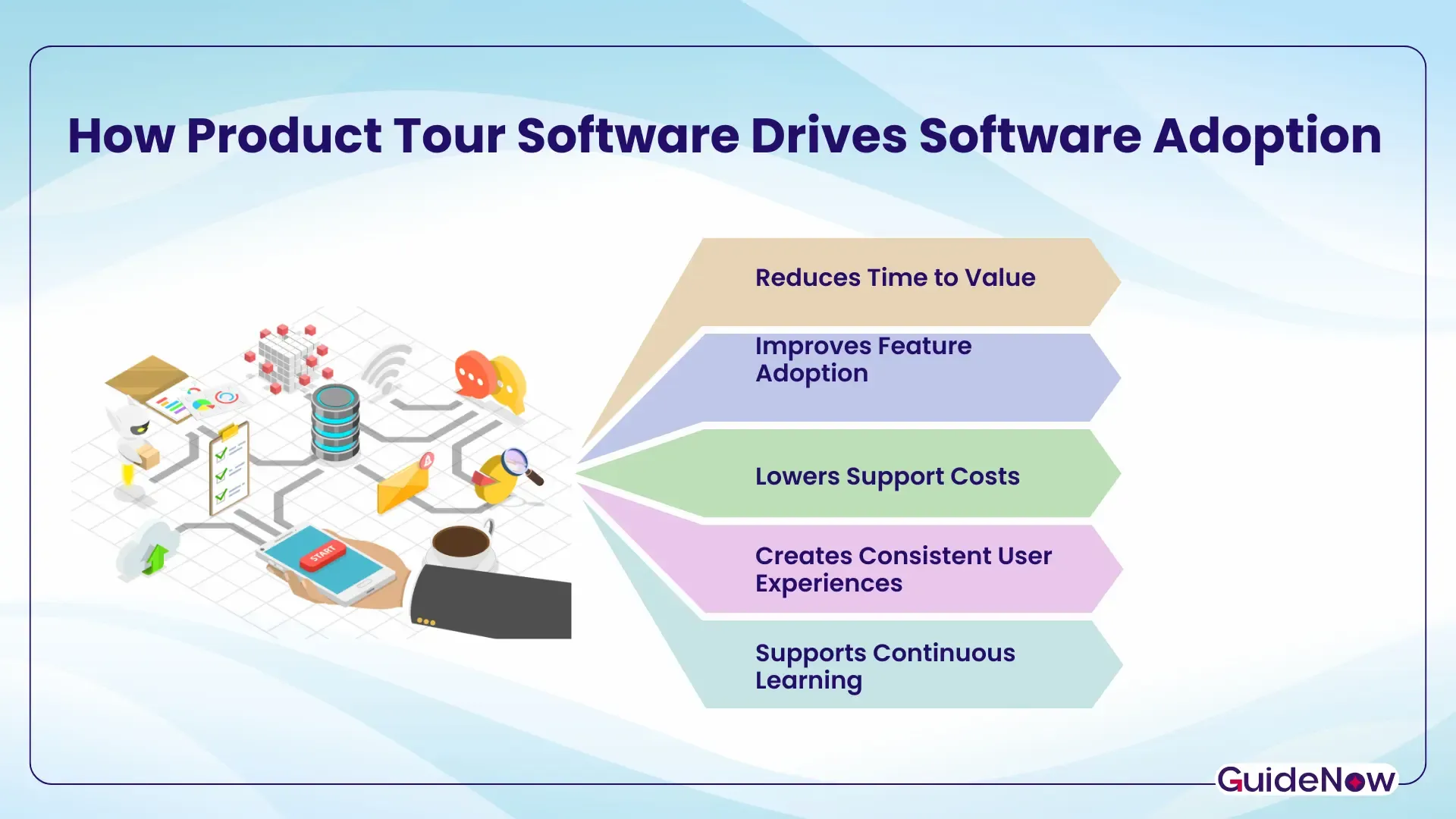
Reduces Time to Value
One of the biggest challenges during onboarding is helping users reach their first meaningful outcome as quickly as possible.
Rather than asking users to explore an unfamiliar interface independently, interactive product tour experiences guide them toward high-value actions, such as:
• Creating a first project
• Importing customer data
• Configuring account settings
• Completing a workflow
• Inviting team members
The sooner users experience success, the more likely they are to continue using the application.
Improves Feature Adoption
Many enterprise applications contain powerful capabilities that remain undiscovered because users never receive timely guidance.
Instead of displaying every feature at once, modern product walkthrough software introduces relevant capabilities when users are ready to use them.
For example:
• Sales teams may discover forecasting tools after successfully managing opportunities.
• HR managers may be guided to automate onboarding workflows after hiring new employees.
• Finance users may receive contextual prompts for advanced reporting once they complete basic accounting tasks.
This progressive learning approach significantly improves feature adoption while reducing information overload.
Lowers Support Costs
Support teams frequently receive repetitive questions about routine tasks rather than technical problems.
Common examples include:
• "Where do I update my profile?"
• "How do I generate this report?"
• "How do I invite teammates?"
• "Where can I find approval workflows?"
By embedding guidance directly within the application, organizations enable users to solve these questions independently.
This reduces:
• Help desk tickets
• Internal support requests
• Training sessions
• Documentation searches
Support teams can then focus on higher-value initiatives instead of answering recurring "how-to" questions.
Creates Consistent User Experiences
Different departments often develop different ways of using the same software.
Without standardized guidance, this can lead to:
• Inconsistent workflows
• Data quality issues
• Compliance risks
• Reduced productivity
Product tours encourage users to follow recommended processes, creating more consistent adoption across teams.
This is particularly valuable for organizations managing Employee software onboarding across multiple business units or geographic locations.
Supports Continuous Learning
Software adoption does not end after the first login.
Applications evolve continuously through:
• Feature releases
• Workflow improvements
• AI-powered enhancements
• Compliance updates
• User interface changes
Rather than requiring employees to attend new training sessions for every update, organizations can deliver contextual guidance exactly when users encounter new functionality.
This creates an ongoing learning experience that supports long-term enterprise software adoption.
Where Product Tours Deliver the Greatest Business Value
Different industries and departments benefit from product tours in different ways.
The following examples illustrate how organizations use guided experiences to accelerate adoption and improve productivity.
Business Function | Product Tour Objective |
| CRM | Guide sales teams through lead creation, pipeline management, and forecasting |
| HR | Walk managers through hiring, onboarding, and performance reviews |
| Finance | Help employees complete expense reporting and approvals accurately |
| Customer Support | Introduce ticket management workflows and knowledge base features |
| IT | Assist users with system configuration and application setup |
| Project Management | Guide teams through project creation, task assignment, and collaboration |
Best Practices for Designing Effective Product Tours
An effective product tour should help users achieve meaningful outcomes—not simply introduce every feature.
Consider the following best practices when designing onboarding experiences.
Focus on User Goals
Users care less about exploring menus and more about accomplishing specific tasks.
Design product tours around outcomes such as:
• Creating the first record
• Completing an approval
• Sending the first campaign
• Building the first dashboard
Goal-oriented onboarding improves engagement and encourages continued product usage.
Keep Each Step Concise
Long onboarding experiences often discourage users from completing the tour.
Instead:
• Explain one concept at a time.
• Use clear, action-oriented language.
• Avoid unnecessary technical terminology.
• Guide users through real interactions rather than passive reading.
Shorter experiences reduce cognitive overload and improve completion rates.
Personalize the Experience
Different users have different responsibilities.
A finance manager and a sales executive should not receive identical onboarding experiences.
Segment product tours by:
• Role
• Department
• Experience level
• User permissions
• Product usage
Personalized guidance makes onboarding more relevant and increases engagement.
Introduce Advanced Features Gradually
Avoid overwhelming users with every capability during the first session.
Instead, reveal features progressively as users become more familiar with the application.
This approach encourages long-term Product onboarding while naturally increasing feature adoption.
Measure and Optimize Continuously
Effective onboarding should evolve based on user behavior.
Track metrics such as:
• Tour completion rate
• Time to first value
• Feature usage
• Workflow completion
• Support ticket volume
• User retention
These insights help organizations improve onboarding over time rather than treating it as a one-time project.
Why Product Tours Are Becoming a Core Component of Digital Adoption
Organizations are increasingly adopting broader digital adoption strategies to maximize the value of enterprise software investments.
According to Gartner's 2024 Hype Cycle for Digital Workplace Applications, Everyday AI and Digital Employee Experience (DEX) are expected to reach mainstream adoption in less than two years, highlighting the growing importance of reducing digital friction and helping employees adopt workplace technologies more effectively.
According to McKinsey, employees are more ready to adopt new technologies than their organizations are prepared to transform around them. In a global survey, 91% of employees reported using generative AI for work, while organizational maturity remained significantly lower. The findings highlight that successful technology adoption requires effective change management, user enablement, and contextual guidance—not just software deployment.
These findings reinforce why many enterprises now consider dap platform capabilities an essential part of modern software enablement rather than an optional add-on.
Product Tours Within the Technology Adoption Journey
Every organization moves through the technology adoption curve as employees learn, adopt, and eventually optimize new software.
During the early stages of the technology adoption lifecycle, users often require more structured guidance.
As confidence grows, onboarding shifts from foundational walkthroughs to contextual tips, advanced feature discovery, and ongoing performance support.
This gradual progression aligns closely with broader people process technology initiatives, where successful transformation depends on balancing technology implementation with employee enablement and process improvement.
Rather than viewing onboarding as a one-time event, leading organizations treat it as a continuous adoption strategy that evolves alongside user needs.
Common Mistakes to Avoid When Creating Product Tours
Even well-intentioned onboarding experiences can fail if they prioritize product features over user outcomes. Avoiding the following mistakes can significantly improve user engagement and long-term adoption.
Trying to Explain Everything at Once
One of the most common onboarding mistakes is introducing every feature during the first session.
New users don't need a complete product demonstration—they need enough guidance to accomplish their first meaningful task.
Break onboarding into smaller experiences that appear progressively as users become more familiar with the application.
Designing Generic Tours for Every User
Different users have different objectives.
A sales representative, HR manager, finance analyst, and administrator each interact with software differently.
Creating role-specific onboarding journeys improves relevance and reduces unnecessary guidance.
Modern user onboarding software should support personalized experiences based on user roles, permissions, departments, or lifecycle stages.
Interrupting User Workflows
Product tours should assist users—not distract them.
Avoid:
• Large pop-ups covering important screens
• Long mandatory walkthroughs
• Excessive tooltip sequences
• Repetitive messages
Instead, provide contextual guidance that appears naturally during real workflows.
Ignoring User Behavior
User needs change over time.
If onboarding experiences remain unchanged after product updates, users may struggle to discover new functionality.
Organizations should continuously analyze:
• Feature usage
• Drop-off points
• Tour completion
• User feedback
• Support requests
Behavioral insights help refine onboarding experiences and improve long-term adoption.
Measuring Completion Instead of Success
Many organizations celebrate high onboarding completion rates without measuring whether users actually succeed.
More meaningful KPIs include:
• Time to first value
• Feature adoption rate
• Workflow completion
• Product engagement
• User retention
• Reduction in support tickets
Ultimately, onboarding should improve business outcomes—not just increase tour completion percentages.
How to Choose the Right Product Tour Software
Not every solution offers the same capabilities. The best platform depends on your organization's size, software complexity, user base, and adoption goals.
When evaluating product tour software, consider the following criteria:
Evaluation Criteria | Why It Matters |
| No-code or low-code tour builder | Enables business teams to create and update tours without relying heavily on developers. |
| Interactive walkthroughs | Guides users through real tasks instead of static demonstrations. |
| Context-aware triggers | Displays guidance based on user actions, page location, or lifecycle stage. |
| User segmentation | Delivers personalized onboarding experiences for different roles or audiences. |
| Analytics and reporting | Measures tour completion, feature usage, and adoption trends. |
| Multi-format guidance | Supports tooltips, hotspots, checklists, banners, and embedded walkthroughs. |
| Enterprise scalability | Handles large user bases, governance requirements, and complex applications. |
| Integration capabilities | Connects with CRM, HRMS, analytics, and enterprise software ecosystems. |
Organizations should prioritize solutions that support continuous learning rather than one-time onboarding experiences.
One example is GuideNow, an AI-powered digital adoption platform that helps organizations deliver contextual in-app guidance across enterprise applications as part of a broader adoption strategy.
Product Tours as Part of a Broader Digital Adoption Strategy
While product tours are highly effective, they deliver the greatest value when integrated into a comprehensive digital adoption strategy.
Successful organizations combine:
• Interactive onboarding
• Contextual guidance
• Self-service support
• Behavioral analytics
• User segmentation
• Performance insights
Together, these capabilities help users progress from basic familiarity to confident, productive software usage.
Rather than treating onboarding as a standalone event, organizations increasingly view it as an ongoing process that supports continuous learning, organizational change, and technology optimization.
Conclusion
Modern software success depends on more than delivering innovative features—it depends on helping users adopt those features with confidence.
A well-designed product tour transforms onboarding from a one-time introduction into an interactive learning experience that supports users throughout their journey. By guiding users within the application, organizations can reduce friction, shorten time to value, improve software adoption, and encourage sustained feature adoption without overwhelming users with unnecessary information.
As enterprise applications continue to evolve, organizations need onboarding experiences that adapt alongside their users. Investing in the right product tour software enables businesses to deliver contextual guidance, reinforce best practices, and create consistent user experiences that drive measurable business outcomes.
Whether you're onboarding new employees, introducing enterprise software, or helping customers discover advanced capabilities, interactive product tours play a critical role in building confident users and maximizing the return on technology investments.
Frequently Asked Questions(FAQ's)
1. When should a company use a product tour instead of traditional user training?
Organizations should use a product tour when users need guidance while performing tasks inside the application. Unlike classroom training or documentation, interactive product tours provide contextual assistance exactly when users need it, reducing learning time and helping employees or customers become productive faster. Traditional training still plays an important role for complex concepts, but in-app guidance is more effective for day-to-day software adoption.
2. How does a product tour improve software adoption?
A product tour reduces the learning curve by guiding users through important workflows inside the application. This helps users reach value faster, increases confidence, improves feature discovery, and reduces dependence on documentation or support teams.
3. What is the difference between a product tour and a product walkthrough?
A product tour usually provides a structured introduction to key features or workflows, while product walkthrough software can deliver contextual, task-specific guidance throughout the user lifecycle. Many modern onboarding platforms combine both capabilities to support continuous learning.
4. Can product tours be used for employee onboarding?
Yes. Organizations frequently use product tours during Employee software onboarding to help employees learn CRM, ERP, HRMS, finance, and other enterprise applications. Interactive guidance improves productivity, standardizes workflows, and supports faster adoption of new software.
5. What features should businesses look for in product tour software?
When selecting product tour software, businesses should look for interactive walkthroughs, user segmentation, contextual triggers, analytics, no-code editing, integration capabilities, and support for scalable enterprise onboarding experiences. These features help organizations deliver personalized guidance and continuously optimize user adoption.