ThoughtSpot helped popularize the idea that a business user should be able to ask a question in plain language instead of waiting in line for a dashboard. It is a serious platform. It is also priced and architected in ways that suit some organizations far better than others.
This guide covers what ThoughtSpot does well, why teams shop around, and five ThoughtSpot competitors worth a genuine evaluation. Every price quoted here comes from the vendor’s own pricing page, so you can verify it yourself before you build a business case.
What Is ThoughtSpot, and What Does It Do Well?
ThoughtSpot is an AI analytics platform built around search and, more recently, around agents. Instead of opening a prebuilt report, you ask a question and the platform returns an answer with a visualization attached.
Its agent lineup is branded Spotter, which ThoughtSpot describes as an always-on AI Analyst, alongside SpotterModel for data modeling, SpotterViz for dashboards and visualizations, and SpotterCode for coding tasks. If you have read older comparisons that mention ThoughtSpot Sage, Spotter is the branding you will find across the product pages today. ThoughtSpot markets the whole stack as agentic analytics.
Buyers generally rate it well. On Gartner Peer Insights, ThoughtSpot Analytics holds 4.5 out of 5 from 689 ratings, and the products its reviewers most often also considered are Tableau, Microsoft Power BI, and Qlik. Useful signal: the real cross-shop set is established BI platforms, not newer point tools.
Where ThoughtSpot is strongest is conversational analytics on governed, warehouse-resident data. If your numbers already sit in Snowflake, Databricks, or BigQuery and your model is clean, it performs.
Why Teams Start Looking for a ThoughtSpot Alternative
The complaints are consistent, and none of them are really about whether the product works.
Cost predictability: Credit-based consumption means your invoice tracks activity, not headcount. That is efficient when usage is flat and uncomfortable when adoption suddenly succeeds. Finance teams dislike a line item they cannot forecast.
The modeling tax: Agent-driven analytics only feels magical when the semantic layer beneath it is well built. That work is ongoing and it appears on no price list. Teams that expected to retire static dashboards in a quarter often find they traded dashboard maintenance for model maintenance.
Structured data only: Ask most AI BI tools a question whose answer lives in a contract, a policy PDF, or a shared spreadsheet, and you get nothing back. A large share of the questions executives actually ask fall into exactly that gap.
Query ceilings on the AI layer: When the agent that justified the purchase is metered, adoption becomes something you ration rather than something you encourage.
Five ThoughtSpot Competitors Worth Evaluating
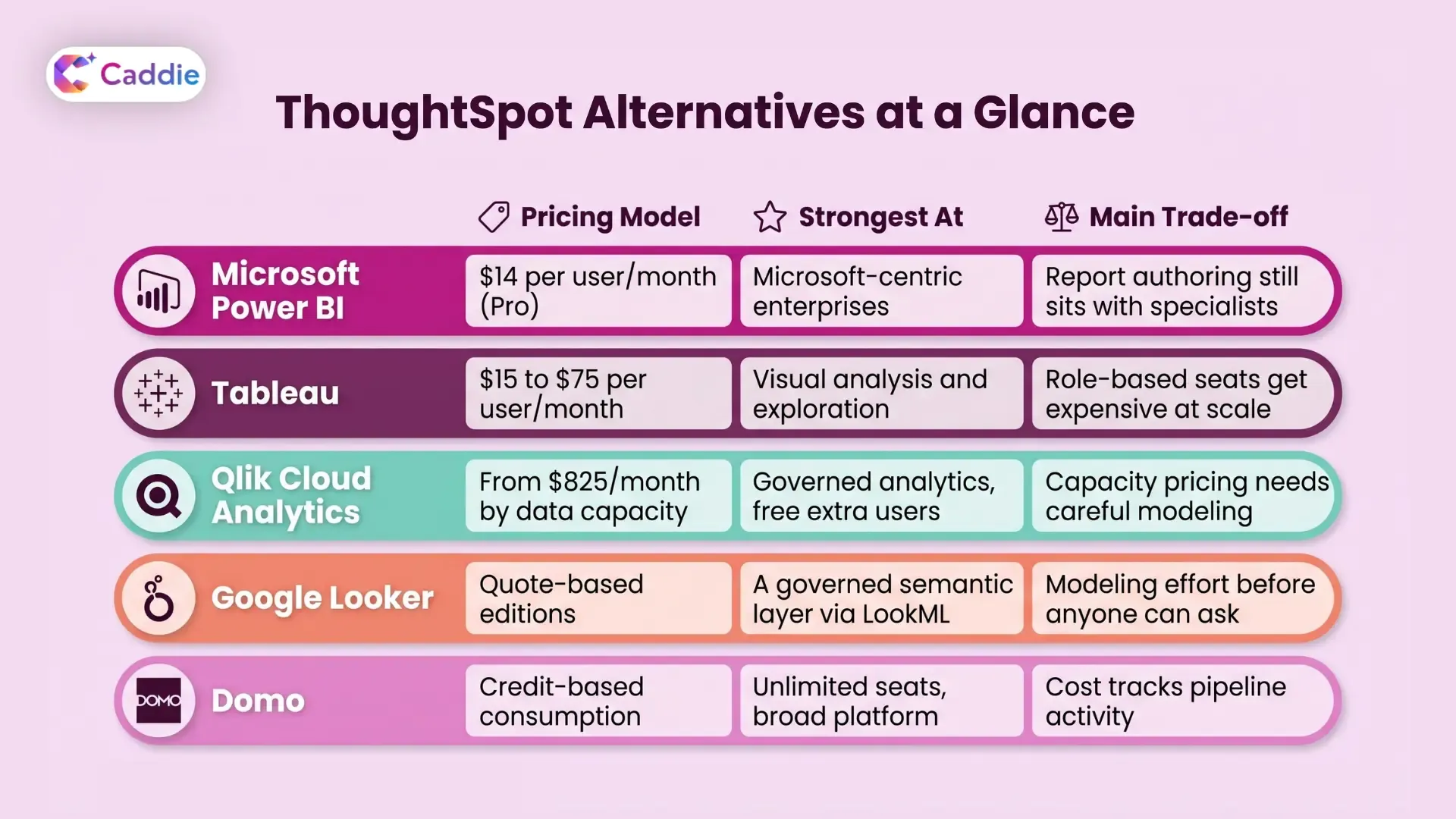
These five are the platforms buyers genuinely cross-shop, based on what ThoughtSpot reviewers say they also considered and on the vendors that appear consistently across published comparisons.
Microsoft Power BI
If your organization already runs on Microsoft 365, Power BI is the default comparison in almost every ThoughtSpot vs Power BI conversation, and price is the reason. Microsoft lists Power BI Pro at $14 per user per month billed annually and Premium Per User at $24, with a free tier for individual use.
You get deep integration with Excel, Teams, and Azure, a large connector library, and per-seat costs your CFO can model on one line. The trade-off is that Power BI is still a report-authoring tool at heart, and its AI capabilities live in Microsoft Fabric, so check what your license actually covers before you promise anyone a chat interface.
Tableau
Tableau is the visualization benchmark, and the ThoughtSpot vs Tableau matchup is really a question about who does the analysis. Tableau prices its Standard edition at $75 per user per month for Creator, $42 for Explorer, and $15 for Viewer, all billed annually. Enterprise edition moves those to $115, $70, and $35, and adds Data Management, Advanced Management, and eLearning. Every deployment needs at least one Creator license.
In skilled hands, nothing beats Tableau for exploratory visual analysis. But role-based licensing means you are constantly deciding who deserves to author, which is the opposite of what most self-service analytics programs are trying to achieve.
Qlik Cloud Analytics
Qlik takes a different approach to pricing entirely. Its plans start with Starter at $300 per month for 10 users, then move to capacity-based licensing: Standard from $825 per month for 25 GB of data for analysis, and Premium from $2,750 per month for 50 GB, all billed annually.
The detail worth noticing is that from Standard upward there is no extra cost for additional users, which flips the usual adoption penalty on its head. Qlik also lists unstructured data and generative AI capabilities, Answers Agents, and an MCP server in those tiers. The catch: your bill depends on how much data you load, so a growing dataset costs you even if nobody queries it.
Google Looker
Looker is the governance answer. Its LookML semantic layer forces metric definitions into one place, which is why it keeps appearing on the shortlist of any team that has been burned by three departments reporting three different revenue numbers.
Google prices Looker through Standard, Enterprise, and Embed editions with quote-based platform pricing, plus per-user licenses. Its conversational analytics feature is metered in data tokens, with monthly allocations of 1 million input tokens for Viewer users, 2 million for Standard, and 4 million for Developer, and unlimited access without quota limits through September 30, 2026. Looker suits you if you have the appetite to model first and ask natural language queries second, and if your stack already leans toward Google Cloud.
Domo
The Domo vs ThoughtSpot comparison usually comes down to breadth against depth. Domo bundles data integration, transformation, visualization, apps, and automation into one platform with over 1,000 prebuilt connectors.
Domo prices on credit-based consumption rather than seats, so user accounts are unlimited and credits are spent on activity: one credit per table created or updated, one credit per dataflow execution, and consumption-based pricing for its AI Pro tier. Free seats make Domo attractive if you want everyone looking at the same numbers. Just model your refresh cadence honestly, because that is what actually drives the invoice.
How to Choose the Right Platform for Your Team
Feature grids rarely settle an evaluation. These five questions usually do.
Who is actually going to ask the questions? If the answer is analysts, a strong BI tool is fine. If the answer is your COO at 7am before a board call, you need something conversational.
Where do your answers live? If a meaningful share of them sit in PDFs, contracts, and policy documents, most AI BI tools on this list cannot reach them.
Can you forecast the bill? Build a three-year model for each shortlisted vendor at double your expected usage. Consumption pricing rewards you when adoption is flat and punishes you when it works.
What does your security team need? Role-based access, SSO, and audit trails should be in the plan you are buying, not the one above it. Map each option against your data governance standards early.
How much modeling is required before anyone gets value? This is the single biggest driver of time to value, and it is the number nobody puts in a proposal.
If you want a structured way to run this, our guide to choosing an enterprise AI assistant for data and reporting walks through the evaluation criteria in more detail.
Where Caddie Fits
Caddie is VividMinds’ enterprise AI assistant for analytics. You connect your data, ask a question in plain language, and get an answer you can act on, whether it comes from a database or from a PDF, policy, or spreadsheet. That document coverage is the part most AI BI tools on this list do not offer. Caddie is assistive by design: it helps your people reach decisions faster, it does not act on your systems for them. Add mobile and voice access, one-click sharing, and enterprise controls including SSO, MFA, and role-based access, and business users stop queuing for reports.
See what your team could ask on day one. Book a Caddie demo.
Frequently Asked Questions
What is the best ThoughtSpot alternative?
It depends on your stack. Power BI wins on cost, Tableau on visualization, Qlik on user economics, Looker on governance, and Domo on breadth of platform.
How much does ThoughtSpot cost?
ThoughtSpot Essentials starts at $25 per user per month billed annually. Pro starts at $50 per user per month or $0.10 per credit. Enterprise pricing is custom.
Is ThoughtSpot better than Power BI?
ThoughtSpot leads on natural language search and agents. Power BI leads on price and Microsoft integration. Your existing stack usually decides the winner.
What is ThoughtSpot Spotter?
Spotter is ThoughtSpot’s AI analyst agent. It answers questions conversationally and sits alongside SpotterModel, SpotterViz, and SpotterCode in the platform.
Can AI analytics tools query documents?
Most cannot. Standard AI BI platforms query structured warehouse data only. Tools like Caddie also answer questions from PDFs, policies, and spreadsheets.