Think about the last question your dashboards couldn’t answer. How many supplier contracts auto-renew next quarter? Which complaint keeps showing up in this month’s support tickets? What actually changed between the old travel policy and the new one?
The answers exist. They just live in PDFs, emails, ticket threads, and slide decks instead of tidy rows and columns. Your BI stack was built for the rows. The documents sit outside its reach, so someone on your team opens them one at a time, reads, and copies numbers into a spreadsheet.
Unstructured data analytics closes that gap. It turns what your documents say into something you can count, compare, and track over time. This guide walks you through how it works, what you can measure, and how to choose the right approach for your team.
What Is Unstructured Data Analytics?
Unstructured data analytics is the practice of extracting facts, patterns, and metrics from information that doesn’t follow a fixed schema, then using them the same way you use any other business data.
The difference between structured vs unstructured data comes down to predictability. A sales table has fixed columns: date, region, amount. A contract has a renewal date too, but it might sit on page 14, phrased three different ways across three vendors.
Common unstructured data examples in your organization include:
- Contracts, invoices, and purchase orders
- Policies, SOPs, and compliance documents
- Support tickets, chat transcripts, and emails
- Survey comments, product reviews, and call notes
- Board decks, project reports, and meeting minutes
There’s also a middle ground. Semi-structured data, such as JSON files, email headers, or forms with free-text fields, carries some labels but no complete schema. Most real business questions touch all three types at once.
Why Your Documents Rarely Make It Into Reports
Gartner has a name for information you collect and store but never use for analytics: dark data. According to Gartner’s definition, it often makes up most of an organization’s information assets, and companies frequently keep it for compliance purposes only.
Documents go dark for practical reasons. Text is messy. Traditional BI tools need a schema before they can query anything, and nobody has time to build one for every contract template or ticket format. So the files get stored, backed up, and secured, but rarely measured.
The readiness gap is wide. In an October 2026 Komprise survey of 500 technical decision makers, only 4% said more than 70% of their unstructured data was ready, with schema, for analysis in a lakehouse. Only 24% had more than half ready. Put simply, most enterprises still can’t query the majority of what they store.
How Unstructured Data Analysis Turns Text Into Numbers
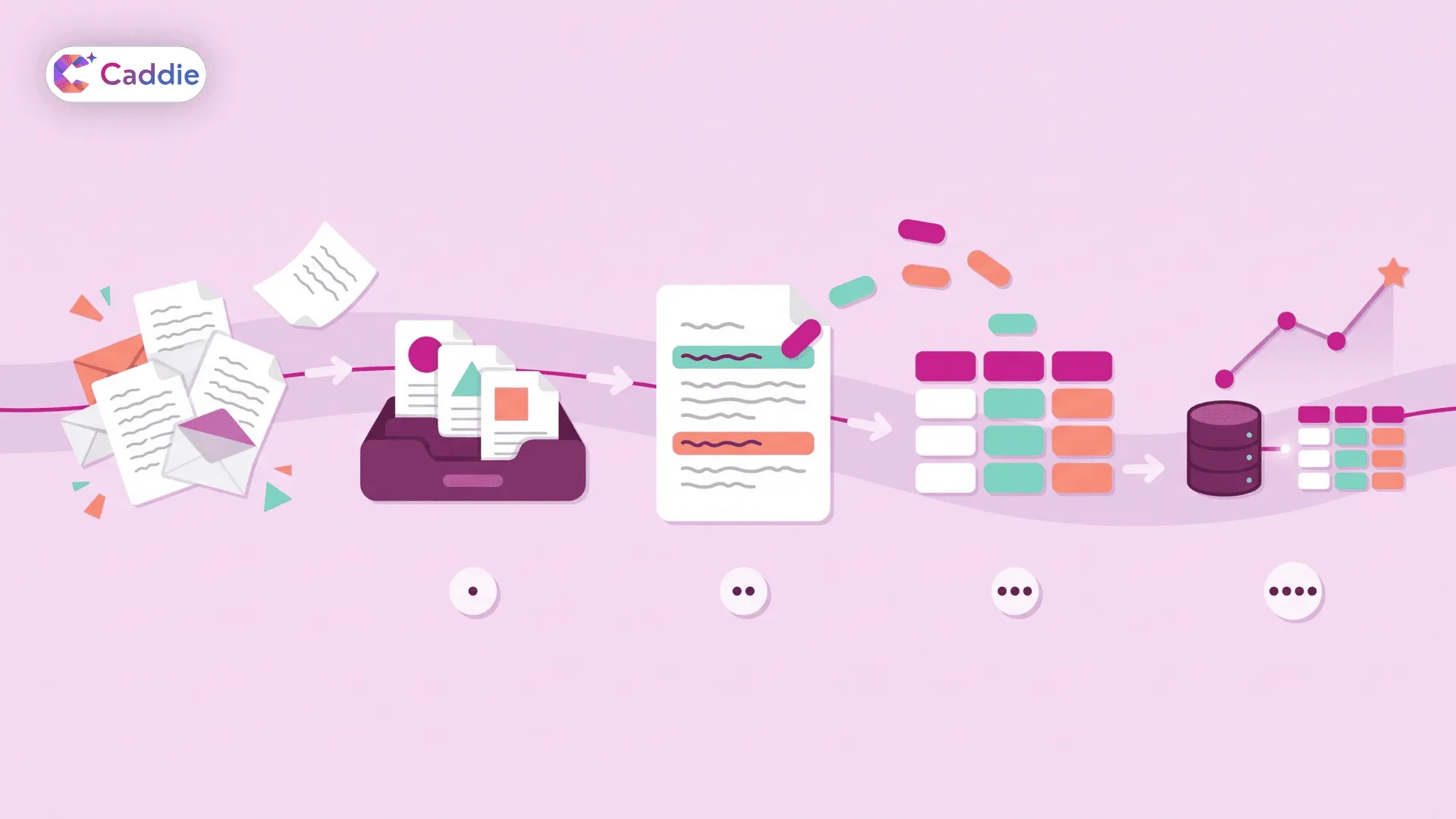
You don’t need to understand every model under the hood. You do need to know the four stages that take a document from “file on a shared drive” to “number on a chart.”
1. Classify What You Have
First, the system works out what each file is: a contract, an invoice, a complaint, a policy. Classification lets you analyze like with like, so you’re never comparing an NDA to a quarterly report.
2. Extract the Fields That Matter
Next, natural language processing pulls out entities and values such as party names, dates, amounts, products, clauses, and reasons for contact. This is where unstructured data processing does its heaviest lifting, because the same fact can be written dozens of different ways.
3. Give the Output a Structure
Extracted values land in consistent fields. “Auto-renews unless terminated with 60 days’ notice” becomes a row with a renewal type and a notice period. Once text has a shape, you can filter, group, and aggregate it.
4. Join It With Your Structured Data
The real payoff comes when document data meets the numbers you already track. Contract terms next to spend. Ticket themes next to churn. Policy versions next to audit findings. That join is what turns isolated facts into measurable insight.
Text analytics adds another layer on top, scoring sentiment, spotting recurring themes, and tracking how often a topic appears week over week. Together, these steps turn reading into counting.
What You Can Measure Once Your Documents Start Talking
This is where analyzing unstructured data starts paying for itself. Here are a few examples by function.
Contracts and Procurement
Track how many contracts auto-renew in the next 90 days, which vendors carry non-standard liability terms, and how payment terms vary by supplier. Your procurement team stops discovering renewals the week they hit.
Customer Support and Feedback
Turn thousands of tickets and survey comments into a ranked list of complaint drivers. Watch whether billing confusion rises after a pricing change. Then tie theme volume to retention data to see which issues actually cost you customers.
Policies and Compliance
Compare policy versions, flag documents missing required clauses, and count how many business units still reference an outdated standard. Compliance reviews move from spot-checking a sample to covering everything.
Operations and Projects
Pull delay reasons out of project reports and incident logs, then trend them by site or quarter. A recurring supplier issue that hid across 40 status updates becomes one visible line on a chart.
The pattern is the same everywhere: define the question, extract the fields that answer it, then track the result like any other metric. If you already run KPI analytics, these document-based measures can sit right beside your existing scorecards.
Analytics Is Not the Same as Search
It’s easy to blur unstructured data analytics with tools that help you find documents. They solve different problems.
Enterprise search retrieves. Ask where the renewal clause for one account lives, and it returns that passage. Analytics measures. Ask how many renewal clauses expire this quarter across 2,000 contracts, and you need extraction, aggregation, and a number at the end.
Most teams eventually want both. But if your question starts with “how many,” “how often,” or “what’s the trend,” you’re in analytics territory. The two work well together: search helps you find the source, and analytics tells you how much of it there is and whether it’s growing.
How to Choose Unstructured Data Analysis Tools
The market for document intelligence and AI for unstructured data is crowded, and many demos look alike. These five checks separate tools that hold up in production from tools that only shine on sample files.
Traceability
Every number should link back to the document and passage it came from. If you can’t verify an answer, you won’t trust it a second time.
Mixed-Format Handling
Test scanned PDFs, multi-tab spreadsheets, long contracts, and slide decks from your own archive. Ask how the tool handles tables inside PDFs and handwritten notes on scanned forms. Messy real files are where good demos and good products part ways.
Permission Awareness
Results must respect existing access rules, so a summary never exposes a file a user couldn’t open. Your data governance model should extend to documents instead of stopping at the warehouse.
Structured and Unstructured Together
The tool should answer questions that span your databases and your documents in one place. If you have to export results and stitch them together manually, you’ve just moved the bottleneck.
Plain-Language Access
If only analysts can use the tool, you’ve rebuilt the reporting queue. Business users should be able to ask a question in plain English and get an answer in seconds.
Start With One Measurable Question
Don’t try to analyze every document you own. Pick one high-value question that comes up again and again, such as “Which contracts renew next quarter?” or “What are the top five reasons customers contact support?”
Connect only the sources that hold the answer, define the fields you need, and check the results against a sample your team has already reviewed by hand. Keep the first pilot narrow enough to finish in a few weeks, because early wins build the trust you need to expand. Once the numbers match, add a second question, then a third. Pair that growing library with conversational analytics, and your business users can ask follow-up questions without filing a single ticket.
Analyze What Your Documents Say With Caddie
Caddie is an enterprise AI assistant that lets you ask questions across your databases and documents in plain language. With Document Insights, you can query PDFs, policies, and spreadsheets and get contextual answers in seconds, alongside charts and tables built from your structured data. Role-based access control, SSO, and MFA make sure people see only what they should. Caddie is assistive, not autonomous, so it surfaces the evidence and keeps every decision with you.
Ready to turn your documents into numbers your team can track every week? Book a Caddie demo and bring your own files.
Frequently Asked Questions
What is unstructured data analytics?
It is the process of extracting facts, patterns, and metrics from documents, emails, tickets, and other free-form content, then analyzing them alongside structured business data to support faster, better decisions.
Are PDFs considered unstructured data?
Usually, yes. Most PDFs mix free text, tables, and images without a fixed schema. Even form-based PDFs often include free-text fields, so they need extraction before you can query them.
How do you analyze unstructured data?
Classify your documents, extract the fields that answer your question, give them a consistent structure, then join them with structured data so you can filter, aggregate, and trend the results.
Is unstructured data analytics the same as text analytics?
Not exactly. Text analytics focuses on language patterns like sentiment and themes. Unstructured data analytics is broader, covering extraction, structuring, and combining document data with structured sources into trackable metrics.
What is the difference between structured and unstructured data?
Structured data fits fixed rows and columns, like a sales table. Unstructured data, including contracts, emails, and transcripts, has no predefined schema, so it needs extraction before you measure it.