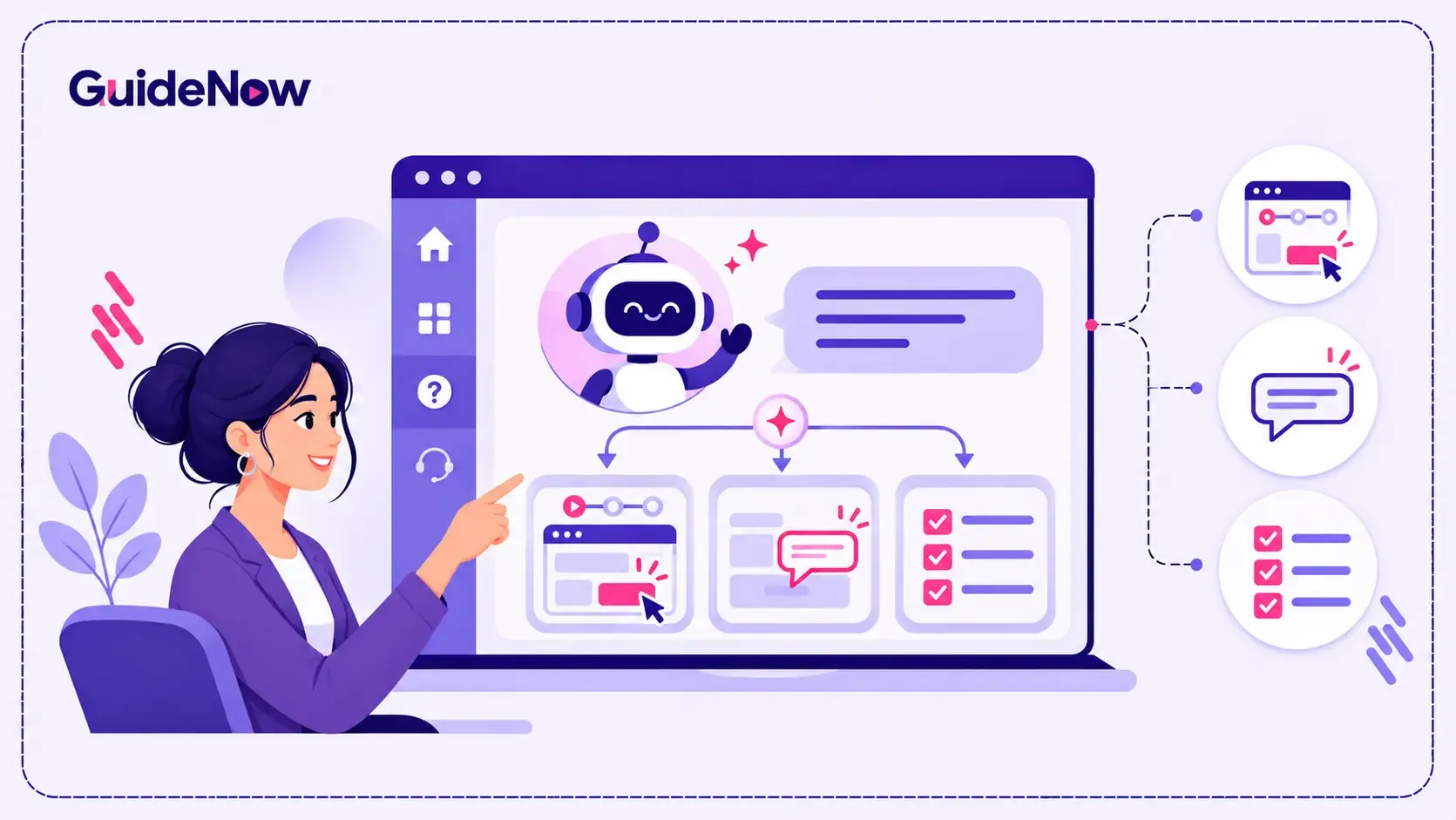
Creating effective software walkthroughs has traditionally required product specialists, instructional designers, and developers to spend hours documenting workflows, capturing screenshots, writing instructions, and configuring interactive elements. As applications evolve, maintaining these resources becomes another ongoing responsibility.
AI is changing this process through prompt-based content creation. Instead of manually building every onboarding experience, teams can describe a task in plain language and use an AI walkthrough generator to create structured guidance, including interactive walkthroughs, contextual tooltips, and onboarding checklists.
For SaaS companies and enterprises, AI-powered guide creation offers a practical way to implement SaaS onboarding best practices by delivering structured walkthroughs, contextual tooltips, and interactive checklists. Instead of relying entirely on lengthy documentation or manual training, organizations can create relevant in-app guidance that helps users understand application features and complete tasks more efficiently.
The difference lies in how the technology interprets instructions, understands application interfaces, generates individual guidance elements, and allows administrators to review and publish the resulting experiences.
This guide explains how prompt-to-guide technology works, which capabilities matter when evaluating solutions, how AI-generated guidance compares with traditional creation methods, and what businesses should consider before investing in an AI-powered guidance platform.
What Is an AI Walkthrough Generator?
An AI walkthrough generator is a tool that uses artificial intelligence to create step-by-step software instructions and interactive onboarding experiences from natural-language prompts or other contextual inputs.
Instead of manually configuring every instruction, administrators describe the workflow they want to explain. Depending on the platform, AI can transform that description into a structured guide containing navigation instructions, tooltips, contextual explanations, and task checklists.
For example, an administrator could enter:
"Create a walkthrough that helps new sales representatives add a lead, enter customer information, assign the lead to a sales representative, and save the record."
The AI can interpret the requested task and generate a sequence of instructions covering the essential actions.
The administrator can then review the generated content, adjust the instructions, verify application elements, and publish the walkthrough.
The important distinction is that generating instructional text and generating a working in-app experience are not the same thing. A capable solution should support the complete process, from understanding the prompt to validating and deploying the guidance.
How Does Prompt-to-Guide Technology Work?
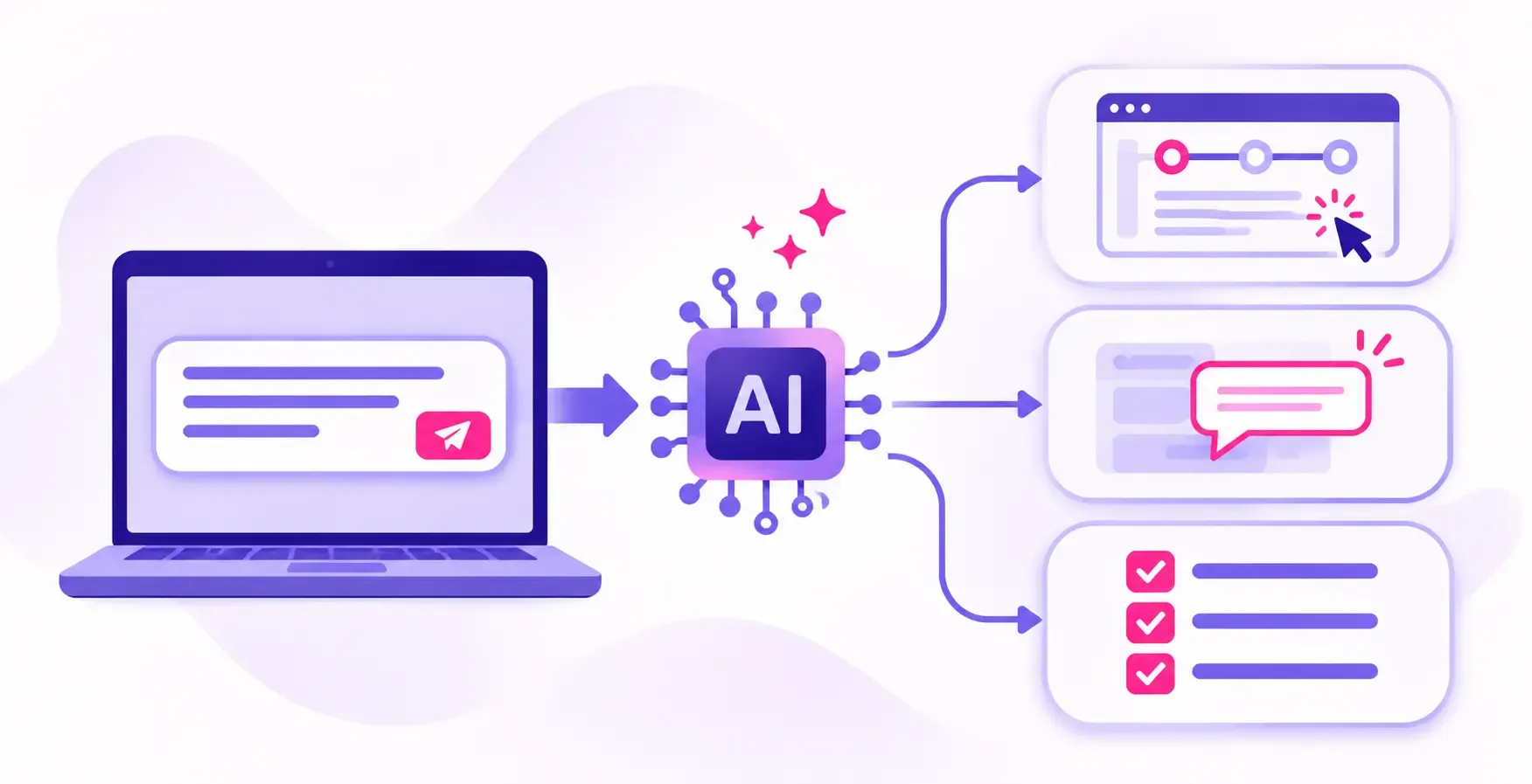
Prompt-to-guide technology combines natural language processing, generative AI, application context, and content-generation capabilities to convert written instructions into structured learning experiences.
Although implementation differs between platforms, the process generally involves five stages.
1. Understanding the Text Prompt
The process starts when an administrator describes a task, workflow, or learning objective.
The AI interprets the prompt to identify:
- The intended user or audience.
- The application or workflow involved.
- The objective employees need to accomplish.
- The sequence of actions required.
- The type of guidance needed.
For example, a prompt describing employee expense submission may require instructions for opening an expense form, entering transaction details, uploading receipts, and submitting the request.
A good generation process should identify the logical sequence rather than simply convert every sentence into a separate instruction.
2. Converting Instructions Into Structured Steps
Once the AI understands the objective, it organizes the requested process into individual actions.
Each action can become a walkthrough step with a title, explanation, and relevant interaction.
For instance:
- Step 1: Open the expense management application.
- Step 2: Select the New Expense option.
- Step 3: Enter the transaction amount and date.
- Step 4: Upload the supporting receipt.
- Step 5: Submit the expense for approval.
This structure makes complex processes easier to follow and gives administrators a starting point for creating interactive guidance.
3. Generating Contextual Tooltips: Practical Tooltip Examples
Not every software instruction requires a complete walkthrough. Sometimes, users only need a short explanation to understand a particular application feature. The following tooltip examples demonstrate how AI can generate contextual assistance for different interface elements:
- Form field tooltip: Explains what information users need to enter in a specific field.
- Approval button tooltip: Clarifies what happens when employees submit a request for approval.
- Reporting filter tooltip: Explains how selecting a date range changes the displayed report.
- Navigation tooltip: Helps first-time users understand where to find important application features.
AI-generated tooltips can help administrators create consistent, context-specific instructions while reducing the effort required to write and configure each guidance element manually.
4. Creating Interactive Checklists
For processes involving multiple independent tasks, AI can organize instructions into checklists.
A new employee onboarding checklist might include:
- Complete profile information.
- Review company policies.
- Configure application preferences.
- Access assigned training resources.
- Complete the required setup activities.
Checklists give employees visibility into their progress and help administrators structure onboarding experiences around clear milestones.
5. Reviewing and Publishing the Generated Guide
The final stage involves checking the generated experience before making it available to users.
Administrators should verify:
- Whether the instructions accurately describe the workflow.
- Whether the selected application elements are correct.
- Whether screenshots and navigation references match the current interface.
- Whether the sequence makes sense for the intended audience.
- Whether the guide works correctly across supported environments.
AI-generated content should be treated as a first draft that requires validation, not automatically approved instructional material.
What Can AI Generate From a Single Text Prompt?
The usefulness of prompt-based creation depends on the types of guidance an organization can generate and how those elements work together.
The effectiveness of prompt-based creation depends on the types of in-app guidance an organization can generate and how easily users can access assistance while working within an application. AI-powered solutions can help administrators create interactive walkthroughs, contextual tooltips, smart prompts, and onboarding checklists that guide users through tasks without requiring them to leave their current workflow.
Three capabilities are particularly important when evaluating an AI-powered guidance solution.
AI-Generated Interactive Walkthroughs
Interactive walkthroughs guide users through a specific process by highlighting application elements and explaining what action to take next.
For example, a customer success team introducing a new CRM could create a walkthrough for adding customer accounts, updating contact details, and recording customer interactions.
Rather than relying entirely on written documentation, users receive instructions while navigating the application.
Contextual Tooltips and Smart Prompts
Tooltips explain individual interface elements without interrupting the entire workflow.
AI can help administrators create descriptions for unfamiliar fields, buttons, and features based on their intended purpose.
For example, when users encounter a reporting filter, a contextual tooltip can explain how selecting a date range changes the displayed results.
This is particularly useful for applications containing complex interfaces or features that employees use infrequently.
Automated Onboarding Checklists
Checklists help users complete a defined set of onboarding activities.
An administrator can describe the onboarding objective, and AI can generate a structured list of activities for review.
For example, a checklist for a newly implemented HR platform could include profile completion, document submission, leave policy review, and employee information verification.
Together, these capabilities support AI User Onboarding by making learning experiences more structured and accessible.
Why Businesses Are Moving Toward AI-Powered Guide Creation
The shift toward AI-generated content is not happening in isolation. Organizations are increasingly exploring how AI can reduce repetitive work and improve employee productivity.
According to McKinsey's Superagency in the Workplace research, 48% of surveyed US employees identified formal generative AI training as an initiative that would increase their daily use of AI tools.
This highlights an important consideration: introducing AI capabilities is not enough. Employees also need accessible instructions and support to use new technologies effectively.
A second indicator comes from the Stanford AI Index Report 2026, which reports that organizational AI use reached 88% in 2025, compared with 78% in 2024, based on the cited McKinsey survey.
These statistics describe broader workplace AI adoption, not adoption of AI walkthrough generators specifically. However, they demonstrate why organizations are evaluating AI for practical business workflows, including training content creation.
For product teams, customer success departments, and enterprise administrators, prompt-based guidance creation can address several operational challenges:
- Reducing repetitive manual content creation.
- Creating consistent instructions across different workflows.
- Updating onboarding materials more efficiently.
- Supporting multiple employee roles.
- Reducing dependence on technical teams for routine content changes.
Understanding the technology adoption curve also helps explain why organizations need structured onboarding and continuous user support when introducing new software. While early adopters may quickly explore new features, other employees often need additional training, practical demonstrations, and contextual assistance before integrating new technologies into their daily workflows. AI-powered walkthroughs and in-app guidance can help bridge this adoption gap by providing support at the point of need.
The potential benefit is not simply producing more guides. It is making relevant guidance easier to create, maintain, and deliver.
Traditional Guide Creation vs. AI-Powered Guide Generation
When evaluating AI Onboarding Tools, organizations should understand how prompt-based generation differs from conventional content creation.
| Evaluation criteria | Traditional guide creation | AI-powered guide generation |
| Content creation | Instructions written manually | Draft instructions generated from prompts |
| Walkthrough development | Steps configured individually | AI structures the requested workflow |
| Tooltip creation | Descriptions written and configured manually | Contextual text can be generated from instructions |
| Checklist creation | Tasks added individually | AI can organize tasks into structured lists |
| Content updates | Administrators revise existing materials | AI can help generate revised drafts |
| Customization | Manual editing and configuration | AI-assisted editing with administrator control |
| Quality assurance | Manual review | AI generation followed by human validation |
| Scalability | Repetitive effort across workflows | Faster creation of reusable guidance content |
AI generation can reduce the initial effort involved in creating guidance, but it does not eliminate the need for application configuration, testing, or content governance.
The strongest solutions combine automation with sufficient editing and publishing controls.
What Features Should You Look for in an AI Walkthrough Generator?
Not every tool marketed as an AI content generator can create usable, interactive software guidance.
If your organization is evaluating solutions, focus on the following capabilities rather than relying solely on claims about AI automation.
1. Natural-Language Prompt Understanding
The platform should interpret everyday instructions without requiring administrators to learn complicated commands or technical syntax.
Look for the ability to describe different workflows, specify user roles, and define clear learning objectives.
2. Multiple Guidance Formats
A useful solution should support more than text generation.
Look for the ability to create walkthroughs, tooltips, hotspots, contextual prompts, and onboarding checklists from the same content-generation workflow.
This is particularly important when evaluating Product Tour Software, because introducing a product and teaching users to complete specific tasks require different types of guidance.
3. No-Code Editing and Customization
AI-generated instructions will not always match the organization's exact workflow.
Administrators should be able to edit titles, descriptions, step sequences, and guidance elements without depending on developers.
4. Application Context and Element Recognition
This is one of the most important evaluation criteria.
A platform should provide a reliable way to connect generated instructions with the relevant application elements.
Ask whether the solution can identify interface elements, associate guidance with the correct fields or buttons, and handle changes to application layouts.
A text-only generator that produces instructions without helping administrators connect them to the actual interface may still require substantial manual work.
5. Preview, Testing, and Publishing Controls
Administrators should be able to preview the generated experience before publishing it.
Look for staging or testing capabilities, revision controls, publishing permissions, and a way to identify outdated instructions.
6. Analytics and Performance Tracking
Generating a guide does not prove that it improves software adoption.
The platform should help administrators understand how users interact with guidance.
Useful metrics include guide completion rates, step abandonment, checklist progress, and user engagement with individual guidance elements.
How to Evaluate an AI Product Tour Generator Before Buying
A practical evaluation should involve testing the platform with a real application workflow rather than relying exclusively on product demonstrations.
Here is a simple evaluation framework.
Test 1: Generate a guide from a basic prompt.
Describe a common task and check whether the AI produces a logical sequence of steps.
Test 2: Generate different guidance formats.
Use a second prompt to create a tooltip and a checklist. Evaluate whether the content matches the intended user objective.
Test 3: Test editing flexibility.
Change a generated instruction, reorder steps, and modify the wording. Check whether administrators can make changes without technical assistance.
Test 4: Verify application alignment.
Connect the guidance to the relevant interface elements and test whether the walkthrough works as expected.
Test 5: Test the published experience.
Run the guide as an actual end user. Check navigation, visibility, step progression, and completion behavior.
Test 6: Review analytics.
Determine whether administrators can measure guide usage and identify where employees encounter difficulties.
A genuine AI product tour generator should make the process more efficient without sacrificing the accuracy or usability of the final experience.
AI Guide Creation vs. Broader Software Adoption Platforms
Standalone content-generation tools and complete adoption platforms solve different problems.
A content generator primarily helps create instructional material. A broader adoption platform can combine content creation with in-application delivery, user targeting, onboarding, and analytics.
| Capability | Standalone AI content generator | Full digital adoption platform |
| Generate instructions from prompts | Yes, depending on tool | Depends on AI capabilities |
| Create walkthroughs | May require separate configuration | Can support interactive in-app experiences |
| Create contextual tooltips | Often requires another tool | Can provide contextual guidance |
| Onboarding checklists | Depends on platform | Can combine with onboarding journeys |
| In-app content delivery | Not always supported | Core capability |
| User targeting | Often limited | Can support user segmentation |
| Adoption analytics | May be limited | Can include usage and engagement analytics |
| Content management | Varies | Can include centralized administration |
As organizations introduce more cloud-based applications, SaaS sprawl can make software onboarding and employee enablement increasingly complex. Employees may need to navigate multiple applications, each with different interfaces, workflows, and learning requirements. A digital adoption platform can help address this challenge by delivering centralized in-app guidance and consistent onboarding experiences across supported enterprise applications.
For organizations considering Interactive Product Tours, the important question is whether the solution supports the entire lifecycle: creation, configuration, delivery, measurement, and ongoing improvement.
A Digital Adoption Platform can provide this broader foundation when an organization needs to manage guidance across multiple application workflows.
How GuideNow Approaches AI-Powered Guide Creation
GuideNow provides an example of how AI-assisted content creation can fit into a broader in-app guidance environment.
Its Donna Creator for administrators supports generating and editing onboarding content, tours, visuals, and workflows using text prompts. The platform also includes interactive tours, tooltips, hotspots, banners, contextual pop-ups, and onboarding experiences.
This distinction matters because creating instructional content is only one part of the overall process. Administrators also need ways to configure guidance, make changes, and deliver relevant experiences inside applications.
When assessing solutions such as GuideNow, businesses should evaluate both the AI content-generation workflow and the capabilities available for managing and delivering the resulting guides.
The objective is to connect content creation with practical software assistance rather than maintaining disconnected instructional resources.
Questions to Ask Before Investing in AI-Powered Guide Creation
Before selecting a solution, involve IT, product, customer success, and learning teams in the evaluation.
Use these questions to determine whether the platform meets your operational requirements:
- Can administrators create walkthroughs, tooltips, and checklists using natural-language prompts?
- Does the platform generate interactive guidance or only instructional text?
- Can administrators edit and validate AI-generated content before publishing?
- Does it support the applications and environments used by our organization?
- Can guidance be customized for different user roles and workflows?
- How does the platform handle application interface changes?
- Does it provide analytics to measure guide engagement and completion?
- What security, privacy, and access controls govern AI-generated content?
- Can the solution scale across multiple applications and departments?
- What implementation, licensing, and ongoing maintenance costs should we expect?
These questions help distinguish practical AI-assisted guidance solutions from tools that offer content generation without a complete deployment workflow.
Conclusion: Turn Simple Prompts Into Practical Software Guidance
Creating software walkthroughs, tooltips, and checklists no longer needs to begin with manually writing every instruction and configuring every content element.
An AI walkthrough generator can help administrators transform natural-language prompts into structured guidance experiences, reducing repetitive creation work and making it easier to develop onboarding resources for different workflows.
However, the real value depends on more than how quickly AI produces a draft. Accuracy, application context, editing flexibility, publishing controls, and analytics determine whether the generated content becomes useful in everyday software interactions.
Organizations evaluating AI-powered guidance solutions should prioritize platforms that connect prompt-based creation with interactive delivery and ongoing content management.
As enterprise applications become more complex, the ability to create and maintain relevant guidance efficiently will become an important part of software adoption and employee enablement.
Frequently Asked Questions(FAQ’s)
1. What is the best AI walkthrough generator for creating software guides?
The best solution depends on whether you need simple instructional text or complete interactive experiences. Evaluate platforms based on natural-language generation, application element recognition, editing controls, walkthrough creation, publishing capabilities, and adoption analytics.
2. Can AI create interactive walkthroughs from a text prompt?
Yes. Depending on the platform, AI can interpret a text prompt, organize the requested workflow into steps, generate instructions, and help configure an interactive walkthrough. Administrators should verify application elements and test the experience before publishing.
3. Can AI generate tooltips and onboarding checklists automatically?
Yes. AI can generate contextual tooltip descriptions and organize onboarding activities into structured checklists based on written instructions. However, administrators should review the content to ensure it accurately reflects the application and business process.
4. What is the difference between AI-generated guides and traditional product tours?
Traditional product tours are generally created by manually configuring steps, descriptions, and interface elements. AI-generated guides use prompts or contextual inputs to accelerate content creation. Both may produce interactive experiences, but AI can reduce the manual effort required to prepare the initial content.
5. Do businesses need a digital adoption platform for AI-generated walkthroughs?
Not necessarily. A standalone generator may be sufficient for creating instructional content. However, organizations that need to publish guidance inside applications, manage user experiences, target different employee groups, and measure adoption may benefit from a complete digital adoption platform.