Fast-moving teams cannot afford long implementation cycles every time they introduce new software, launch a feature, or improve an existing workflow. They need digital adoption tools that are straightforward to install, easy to configure, and manageable without constant developer support.
A digital adoption platform (DAP) can help teams deliver in-app guidance, interactive walkthroughs, contextual tooltips, and onboarding experiences directly inside applications. However, implementation requirements differ. Some platforms focus on SaaS product onboarding, while others support broader enterprise adoption and employee guidance.
The goal is to help product managers, IT leaders, and customer success teams identify the right platform for their technical environment and shortlist vendors for a demo.
Digital Adoption Tools for Fast Deployment
| Digital adoption tool | Best suited for | Deployment consideration | Pricing transparency |
| GuideNow | SaaS and enterprise application adoption | Official website advertises deployment in under five minutes; validate the implementation scope | Custom pricing |
| UserGuiding | SaaS onboarding and self-service guidance | No-code onboarding capabilities; installation and publishing requirements depend on the application | Public plans |
| Userpilot | SaaS product adoption and analytics | Supports in-app engagement and product analytics; assess implementation with your product stack | Public plans |
| Appcues | Product-led onboarding and user engagement | Offers visual in-app experience creation; verify installation and production-launch requirements | Plan-based; confirm a quote |
| Chameleon | Personalized in-product experiences and experimentation | Offers a code-snippet-based implementation and visual experience builder | Public starting prices and custom enterprise pricing |
These platforms are not interchangeable in every environment. A SaaS product team prioritizing activation may need different capabilities from an enterprise IT team supporting employees across business applications.
Pricing and product information should be rechecked with vendors before purchase. Deployment time depends on technical access, application compatibility, configuration, testing, and approval requirements.
1. GuideNow: For Fast Deployment and In-App Guidance
Best for: Teams evaluating a digital adoption platform for contextual guidance, employee enablement, and SaaS onboarding.
GuideNow is an AI-powered digital adoption platform from VividMinds. Its official product page describes no-code in-app experiences, interactive tours, contextual tooltips, AI assistance, and adoption analytics. It also advertises deployment in under five minutes. Buyers should confirm what that timeframe covers and whether it refers to the initial installation or a fully configured production experience.
Relevant features
- No-code experience creation: Drag-and-drop tools for creating in-app guidance.
- Interactive tours and tooltips: Help users navigate unfamiliar interfaces and workflows.
- Announcements and contextual prompts: Communicate updates and surface relevant information inside applications.
- Donna End User AI: Provides contextual assistance and answers user questions within the application.
- Donna Creator: Helps administrators generate and edit onboarding content using text prompts.
- Adoption analytics: Provides visibility into user behavior and areas where users may struggle.
- Enterprise capabilities: The official page describes encryption, role-based access controls, audit logs, APIs, and webhooks.
Deployment considerations
GuideNow is worth evaluating when your priority is to introduce guidance without making users leave their applications. Its official page states that it works across applications without requiring code changes. Nevertheless, confirm support for your specific application, installation method, security requirements, and approval process before committing to a timeline.
Consider GuideNow if: You need in-app guidance, AI-assisted content creation, and adoption analytics in a platform intended for SaaS and enterprise software environments.
2. UserGuiding: For No-Code SaaS Onboarding
Best for: SaaS teams that want to create onboarding flows and self-service product guidance without building every experience from scratch.
UserGuiding focuses on product onboarding and in-app experiences. Its capabilities are relevant to teams that want to introduce new users to product features, guide them through key actions, and provide help within the product.
Relevant features
- Interactive product tours and walkthroughs.
- Tooltips and onboarding checklists.
- In-app announcements and resource centers.
- User segmentation and targeting.
- Analytics and feedback capabilities, depending on the plan.
Deployment considerations
UserGuiding is worth shortlisting if your immediate objective is to launch SaaS onboarding experiences through a no-code workflow. However, no-code content creation does not necessarily eliminate the need to install the platform's code or container, configure user identification, and test experiences.
Before choosing it, check whether your application framework is supported, how installation works, and whether your team can publish and update guidance independently after implementation.
Consider UserGuiding if: You primarily need SaaS onboarding, interactive guides, and self-service resources rather than a broader enterprise-wide adoption program.
3. Userpilot: For Product Adoption and Analytics
Best for: SaaS product managers who want to combine in-app onboarding with product usage insights.
Userpilot combines in-app engagement with product analytics, segmentation, and feedback capabilities. It is particularly relevant when teams want to understand how users interact with a product and use that information to improve onboarding experiences.
Relevant features
- In-app onboarding and engagement experiences.
- User segmentation and behavior tracking.
- Usage trends and product analytics.
- Surveys and feedback collection.
- Session replay and advanced analytics in eligible plans.
- AI-assisted product guidance and content creation capabilities.
Deployment considerations
Userpilot can be a strong candidate when deployment is only one part of the requirement and product analytics is equally important.
The team should evaluate its implementation requirements, including the installation snippet, user identification, event tracking, and integrations. A basic installation may be straightforward, but reliable analytics and behavior-based onboarding can require additional configuration.
Consider Userpilot if: You need a combination of in-app engagement, product analytics, and user feedback to guide product-led growth decisions.
4. Appcues: For Product-Led Onboarding Experiences
Best for: SaaS teams that want to create and manage in-app experiences across the customer lifecycle.
Appcues helps teams build product experiences designed to guide users, communicate changes, and encourage engagement. It is a relevant option for organizations that want to manage onboarding and user engagement without developing each interface element themselves.
Relevant features
- In-app onboarding flows and product experiences.
- User targeting and segmentation.
- Experience analytics and reporting.
- Integrations with other tools in the product and customer success stack.
- AI-supported capabilities, depending on the available plan.
Deployment considerations
Appcues offers a platform for building in-app experiences, but teams should distinguish between creating an experience in its editor and making that experience available in a live application.
Confirm the installation method, supported application environment, required user properties, and the process for testing and publishing changes. Also determine whether the relevant plan supports your intended number of active users and applications.
Consider Appcues if: Your team prioritizes SaaS onboarding, user engagement, and lifecycle experiences, with implementation support available when needed.
5. Chameleon: For Targeted In-Product Experiences
Best for: Product teams that need targeted onboarding, experimentation, and customizable in-product experiences.
Chameleon provides tools for creating product tours, tooltips, launchers, surveys, and other in-product experiences. It also offers audience segmentation and experimentation capabilities, making it useful for teams that want to test different ways of guiding users.
Relevant features
- Tours and contextual tooltips.
- In-product surveys and launchers.
- Audience segmentation and personalization.
- A/B testing and goal tracking.
- AI-assisted experience creation and optimization.
- Integrations and governance capabilities across eligible plans.
Deployment considerations
Chameleon uses a code snippet for implementation. Once installed, teams can create and manage experiences through its platform, but the initial setup still needs to be tested in the target environment.
Check whether your team can install the snippet independently, how monthly tracked users are counted, and which plan includes the targeting, experimentation, and governance features you need.
Consider Chameleon if: You need sophisticated in-product experiences, customization, and experimentation rather than installation speed alone.
Can You Really Set Up a Digital Adoption Platform in 5 Minutes?
Yes, a limited technical installation may be possible within minutes in a suitable environment. However, installing a digital adoption platform and launching a fully configured onboarding experience are two different milestones.
What can happen in the initial setup?
Depending on the platform and application, the initial installation may involve:
- Creating a platform account and obtaining the installation snippet.
- Adding the snippet through an approved integration or tag-management system.
- Verifying that the platform loads correctly in the target application.
If the application already supports the required installation method and the team has the necessary permissions, this stage may be relatively quick.
What does a production-ready launch require?
A usable onboarding experience may also require:
- Configuring user identification and targeting rules.
- Selecting the correct application pages or interface elements.
- Building and reviewing walkthroughs, tooltips, or announcements.
- Testing behavior across user roles, browsers, and environments.
- Validating analytics, security, and privacy requirements.
- Obtaining approval before publishing to production.
These steps can take longer than the initial installation, especially for complex enterprise applications.
GuideNow's official website advertises deployment in under five minutes. That is a useful vendor claim to investigate, but buyers should ask whether it means installing the platform, displaying a basic guide, or delivering a tested onboarding experience to production users.
The practical takeaway: Compare vendors on time to first working experience, time to production, and ongoing maintenance—not just the time needed to install a script.
How to Choose the Best Digital Adoption Tool for Fast Deployment
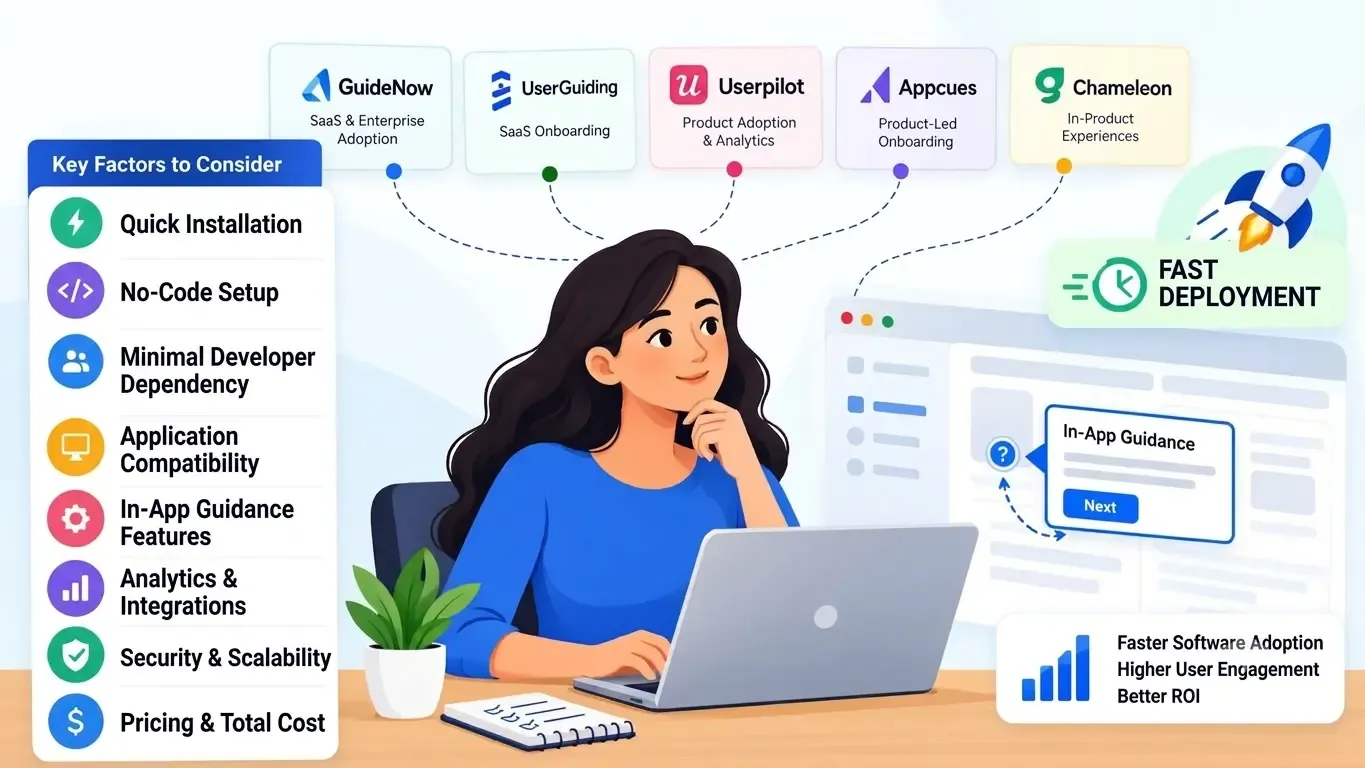
The fastest digital adoption software is not necessarily the best choice for your team. Evaluate the following factors before requesting a demo.
1. Quick installation
Ask how the platform connects to your application and how long a typical implementation takes.
Check whether it supports a JavaScript snippet, tag manager, SDK, or existing integration. For example, Userpilot documents installation through JavaScript, Segment, or Google Tag Manager, while Appcues documents snippet, SDK, and tag-manager options.
A deployment estimate should specify the application type, technical prerequisites, and what counts as a completed installation.
2. No-code setup
No-code onboarding software enables non-technical teams to create and maintain guidance without writing code for every change.
Look for visual editors, reusable templates, editable walkthroughs, and simple publishing controls. Also clarify which activities still require technical support, such as installing the initial script or configuring user identification.
3. Minimal developer dependency
A good platform should reduce repeated engineering requests after installation.
Ask whether product managers and customer success teams can independently:
- Create and update onboarding flows.
- Change tooltips and contextual prompts.
- Target experiences to specific user groups.
- Publish content after testing.
- Review engagement and completion metrics.
4. Application compatibility
Compatibility is particularly important for internal enterprise applications, customized software, and single-page applications.
Before selecting a lightweight DAP for fast deployment, confirm support for your frontend framework, authentication model, application navigation, and security policies.
Do not assume that a tool supporting websites will automatically support every internal application or mobile environment.
5. In-app guidance features
Match features to the actual business requirement.
| Requirement | Capabilities to evaluate |
| New-user onboarding | Tours, checklists, and walkthroughs |
| Employee software training | Step-by-step guidance and contextual help |
| Feature announcements | Banners, prompts, and targeted messages |
| Self-service assistance | Resource centers, searchable help, or AI assistants |
| Complex enterprise workflows | Contextual guidance across relevant applications |
Avoid paying for capabilities your team does not need, but make sure the platform can support future use cases.
6. Analytics and integrations
Check whether the platform measures guide engagement, completion, feature adoption, and points where users abandon an experience.
Review its integrations with your analytics, CRM, customer support, and data platforms. If adoption measurement is a priority, ask whether the required events and user properties are available in your selected plan.
7. Security and scalability
For enterprise applications, evaluate encryption, role-based access, audit logs, data handling, SSO, and compliance requirements.
Confirm how pricing changes as users, applications, and published experiences increase. A tool that is easy to install should also be practical to administer at scale.
8. Pricing and total cost
Compare more than the advertised starting price. Consider monthly active users or tracked users, application limits, feature restrictions, implementation services, support, and contract terms.
Request a quote based on your expected usage and ask the vendor to identify any additional charges before you sign.
Which Digital Adoption Tool Is Best for Your Team?
The right shortlist depends on where guidance will be used and how much implementation support is available.
| Your requirement | Platforms to evaluate |
| Quick SaaS onboarding | UserGuiding, Userpilot, Appcues |
| Product analytics alongside onboarding | Userpilot |
| Targeted in-product experiences and experimentation | Chameleon |
| Internal enterprise applications and contextual employee guidance | GuideNow |
| AI-assisted guidance across SaaS and enterprise use cases | GuideNow |
These are initial shortlist recommendations based on the vendors' published positioning, not verified rankings of deployment speed. Application compatibility, implementation effort, and plan requirements should determine the final choice.
Why Consider GuideNow?
GuideNow is worth evaluating if your requirement extends beyond a basic product tour to contextual guidance and ongoing software adoption.
Its official product page highlights interactive tours, tooltips, hotspots, banners, contextual pop-ups, and no-code experience creation. It also describes Donna End User AI for contextual assistance, Donna Creator for AI-assisted content creation, and analytics for understanding user behavior and adoption patterns.
For enterprise buyers, the page also lists encryption at rest and in transit, role-based access controls, audit logs, REST APIs, and webhooks.
GuideNow advertises deployment in under five minutes and says it can work across applications without code changes. These are vendor-stated capabilities, so buyers should validate them against their own environment rather than assume the same deployment time for every application.
During a demo, ask the team to demonstrate:
- The installation process for your application type.
- How quickly a basic in-app guide can be created and published.
- Which steps require developer or IT involvement.
- How user targeting, analytics, and security are configured.
- What implementation support and pricing apply to your use case.
For teams evaluating a broader digital adoption platform, these questions help establish whether GuideNow meets both immediate deployment needs and longer-term adoption requirements.
Conclusion
The best digital adoption tools for fast-moving teams combine straightforward installation with no-code guidance creation, appropriate analytics, and manageable ongoing maintenance.
UserGuiding, Userpilot, Appcues, and Chameleon are relevant options for different SaaS onboarding software and in-product engagement needs. GuideNow is worth shortlisting when contextual guidance, AI-assisted support, and enterprise application adoption are priorities.
Before choosing, compare deployment requirements, essential features, application compatibility, and total cost. Request a demo using your actual use case, and verify the difference between a quick installation and a production-ready onboarding experience.
Frequently Asked Questions
1. What is the fastest Digital Adoption Platform to set up?
There is no universally verified fastest platform for every application. GuideNow advertises deployment in under five minutes, while other vendors provide installation methods designed to simplify setup. Compare the time required to install the tool, publish a working experience, and complete production testing.
2. Which digital adoption tools require no coding?
GuideNow, UserGuiding, Userpilot, Appcues, and Chameleon all offer visual or no-code ways to create in-app experiences. However, creating content without coding is different from installing the platform. Depending on the application, the initial setup may require a developer or an approved tag-management integration.
3. How much does quick-deploy in-app guidance software cost?
Pricing varies by usage, features, and contract terms. Published examples include UserGuiding Starter from $174 per month when billed annually, Userpilot Starter at $299 per month, and Chameleon Startup from $279 for 2,000 monthly tracked users. Appcues pricing depends on plan and usage, while GuideNow offers custom pricing. Confirm current prices and eligibility with each vendor.
4. Which DAP is best for small teams?
UserGuiding, Userpilot, and Appcues are worth evaluating for SaaS teams starting with onboarding and in-app engagement. Chameleon also offers a Startup plan. The best choice depends on user volume, required analytics, installation access, and budget—not team size alone.
5. Can a DAP be deployed without developer support?
Sometimes. A team may be able to install a platform through an existing tag manager or supported integration without changing application code. Direct installation, mobile SDKs, user identification, and security configuration can still require technical assistance. Confirm the exact requirements with the vendor.
6. How can I compare DAP deployment times accurately?
Ask every vendor to demonstrate the same scenario using your application type. Measure the time to install the platform, create a basic guide, target the intended users, verify analytics, and publish safely. Record which tasks require engineering support so the comparison reflects the full implementation effort.